Include vs Extend in Use Case Diagrams (Drawn in Visio)
Include and extend are the two use case relationships analysts mix up most. Learn the difference with an online banking example, drawn step by step in Visio.
Step by step
Intro
- Include vs extend. Include and extend are the two use case relationships people mix up the most. Let's settle it with one online banking diagram in Visio.
- UML Use Case stencil. I'm using the UML Use Case stencil. Include and extend are both here as connectors.
The set-up
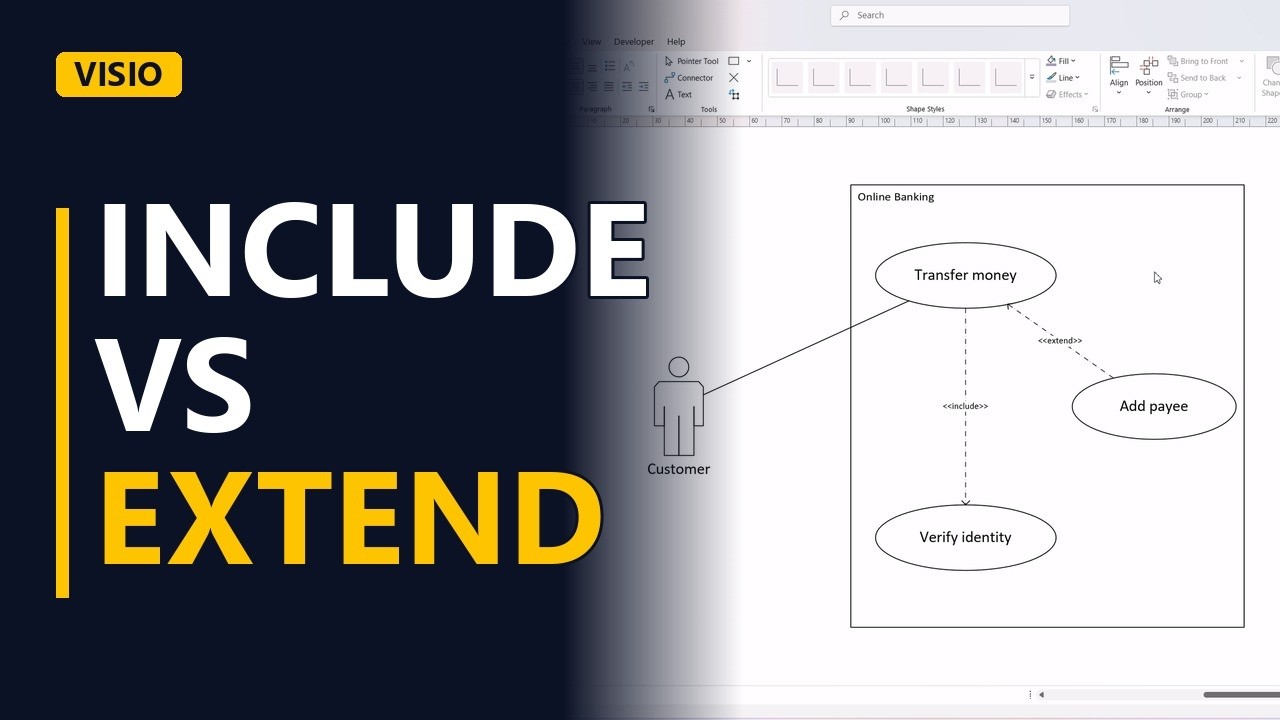
- The set-up. First the system boundary, online banking. A customer actor outside it. And the main goal, transfer money. Connect the customer to it with an association.
Include
- Include = always. Every transfer must verify the customer's identity. Always, no exceptions. That's include. Add verify identity. Draw the include arrow from the main use case to the one it always uses.
Extend
- Extend = sometimes. Sometimes, during a transfer, the customer adds a new payee. Only sometimes. That's extend. Add the use case. And here's the trick. The extend arrow points the other way, from the optional use case back to the main one.
- Done. Click away to see both relationships.
The rule
- The rule. So remember it like this. Include means always, and the arrow points to the helper. Extend means sometimes, and the arrow points back to the main use case.