How to Draw a BPMN Diagram in Visio (Beginner Friendly)
Learn the four BPMN shapes every business analyst needs (start event, task, gateway, end event) and draw a real expense claim process in Visio, step by step.
Step by step
Intro
- BPMN in Visio. You only need 4 BPMN shapes to draw most business processes. Here they are used to draw an expense claim process in Visio, step by step.
- The BPMN Shapes stencil. Start with a blank drawing that has the BPMN Basic Shapes stencil open. The events, tasks, gateways and flows are all in the Shapes pane on the left.
Start event and task
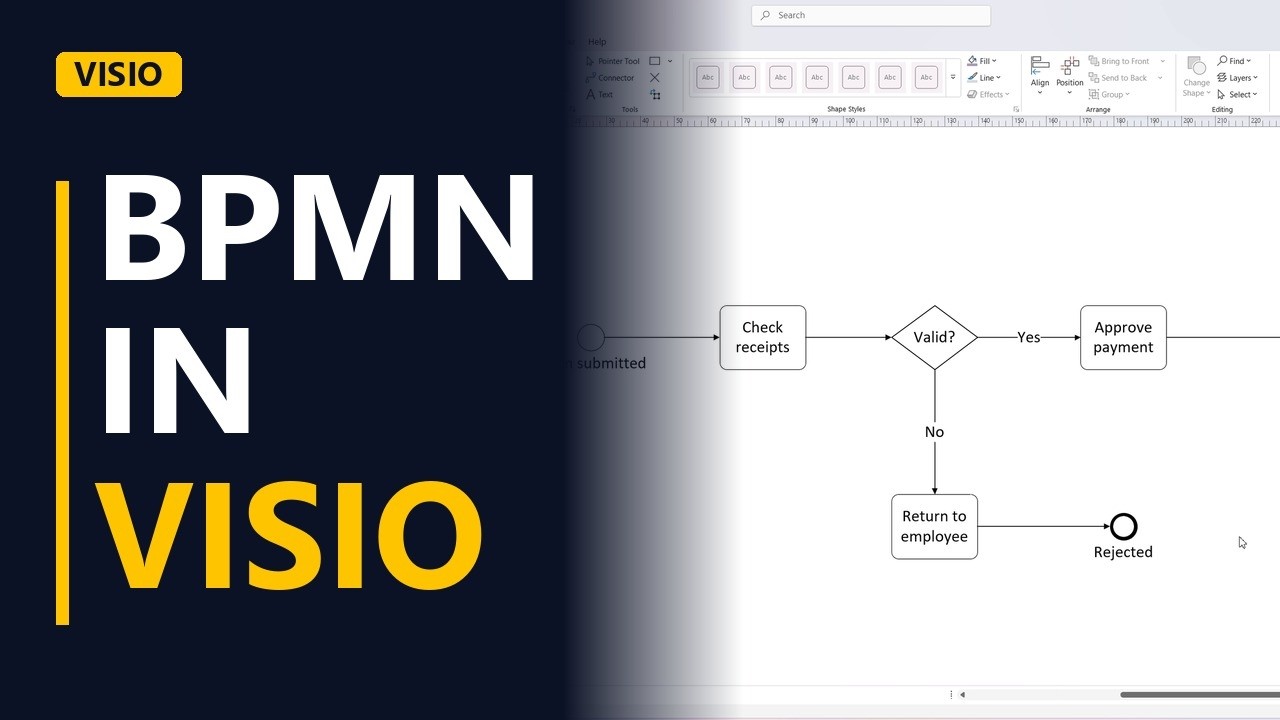
- Shape 1 - Start event. Drag a Start Event onto the page. It's the thin circle, and it shows what triggers the process. Label it Claim submitted, because an employee submitting a claim starts everything.
- Shape 2 - Task. Drag a Task next to it. A task is a rounded rectangle, and it stands for one piece of work. Name it with a verb and a noun: Check receipts.
- Sequence flow. Join Claim submitted to Check receipts with a Sequence Flow. It's the solid arrow, and it shows the order things happen in.
Gateway
- Shape 3 - Gateway. Add a Gateway, the diamond, and label it Valid?. A gateway is a decision point: the process splits here depending on the answer. Then connect Check receipts to the gateway with another Sequence Flow.
The Yes path
- The Yes path. If the receipts are valid, finance approves the payment. Drop another Task on the main line after the gateway and name it Approve payment.
- Label the flow. Connect the gateway to Approve payment and label that flow Yes. Every flow that leaves a gateway needs a label, so the reader knows which answer leads where.
- Shape 4 - End event. Finish the happy path with an End Event, the circle with the thick border. Label it Paid. Then connect Approve payment to Paid.
The No path
- The No path. If the receipts are not valid, the claim goes back to the employee. Drop a Task below the gateway and name it Return to employee.
- Label the flow. Connect the gateway to Return to employee and label this flow No. Now both answers from Valid? are labelled.
- Every path ends. This path needs its own ending too, so add a second End Event and label it Rejected. A process can have more than one end event. Connect Return to employee to Rejected. Every path now runs from the start event to an end event, so the process is complete.
- Done. Click on an empty part of the page to deselect everything and see the whole diagram.
The 4 BPMN shapes
- The 4 BPMN shapes. That's the whole method: start event, task, gateway and end event, joined by sequence flows. With those 4 shapes you can map most processes in BPMN.
Common mistakes
- Unlabelled flows out of a gateway. A diamond with two plain arrows doesn't say which way the claim goes. Label each flow that leaves a gateway with its answer, like Yes and No.
- A path with no end event. The No path in this example needs its own end event (Rejected), just like the Yes path ends at Paid. Check that every path finishes at an end event.
- Mixing up start and end events. Both are circles. The start event has a thin border and the end event has a thick border, so check which one you dragged in before you label it.
- Vague task names. A task called Receipts or Finance doesn't say what happens. Use a verb and a noun, like Check receipts or Approve payment.
When a business analyst uses this
In a process mapping workshop, a business analyst draws the current claim or approval process live in BPMN while stakeholders talk it through. Each gateway, like Valid?, turns into a business rule to write up in the requirements, and each end event shows an outcome the new system has to handle.
Questions people ask
How do I draw a BPMN diagram in Visio?
Open a blank drawing with the BPMN Basic Shapes stencil, drag in a start event, tasks, gateways and end events, and join them with Sequence Flow connectors. Then label each flow that leaves a gateway, such as Yes and No.
What shapes do I need to draw a BPMN diagram?
For most business processes you need 4: a start event (thin circle), a task (rounded rectangle), a gateway (diamond) and an end event (circle with a thick border). Solid sequence flow arrows join them in order.
Can a BPMN diagram have more than one end event?
Yes. Each path can end in its own way. In the expense claim example, the Yes path ends at Paid and the No path ends at Rejected.