Actor Generalization in Use Case Diagrams (UML in Visio)
When one kind of user can do everything another can, plus more, use actor generalization. Learn the hollow triangle arrow and which way it points, with a hotel booking system drawn in Visio.
Step by step
- Actor generalization. A loyalty member can do everything a normal guest can, plus a bit more. In a use case diagram, you show that with generalization. Let's draw it in Visio for a hotel booking system.
- UML Use Case stencil. I'm using the UML Use Case stencil.
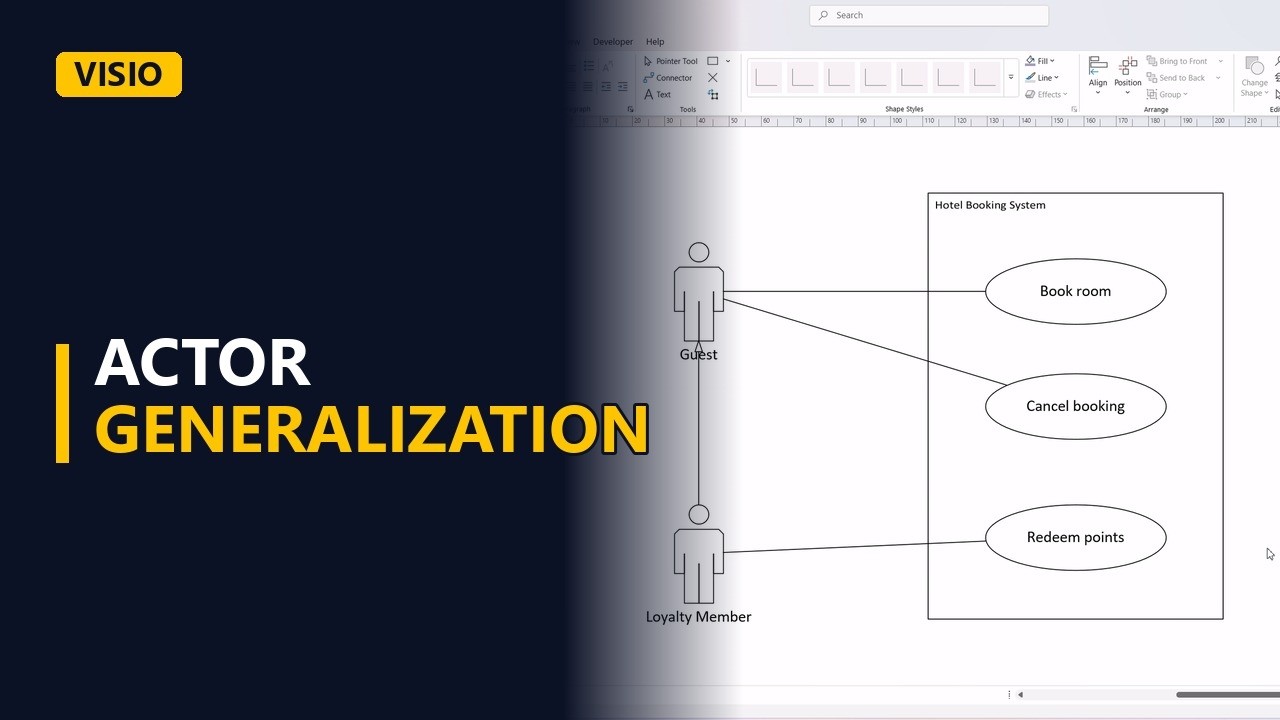
- The set-up. First, the system boundary. A guest actor on the left. Guests book rooms. Connect them with an association. Guests can also cancel a booking. Connect that too.
- The special actor. Now the loyalty member. Put the actor below the guest.
- Generalization. Draw a generalization from the member to the guest. The hollow triangle points at the general actor. Read it as, a loyalty member is a guest.
- Only the extra. Members inherit book room and cancel booking, so no extra lines. Only add what's new. Members can redeem points. Connect the member to it.
- Done. Click away to see the finished diagram.
- The rule. So, the triangle points at the general actor, and the special actor only gets lines to its extra use cases. It keeps the diagram clean, and it tells developers who may do what.