One-to-One Relationships in an ER Diagram: When to Use Them (Visio)
One-to-one relationships are rare, and people argue about them. Draw an employee and a security badge in Visio with crow's foot notation, see where the foreign key goes, and learn when a one-to-one should just be a column instead.
Step by step
- One-to-one. One-to-one relationships are rare, and people disagree about when to use them. The real question is when to draw one and when the data should just be a column. The example here is an employee and a security badge in Visio.
- Crow's Foot stencil. In the Shapes pane, use the Crow's Foot Database Notation stencil. It has the entity and relationship shapes used below.
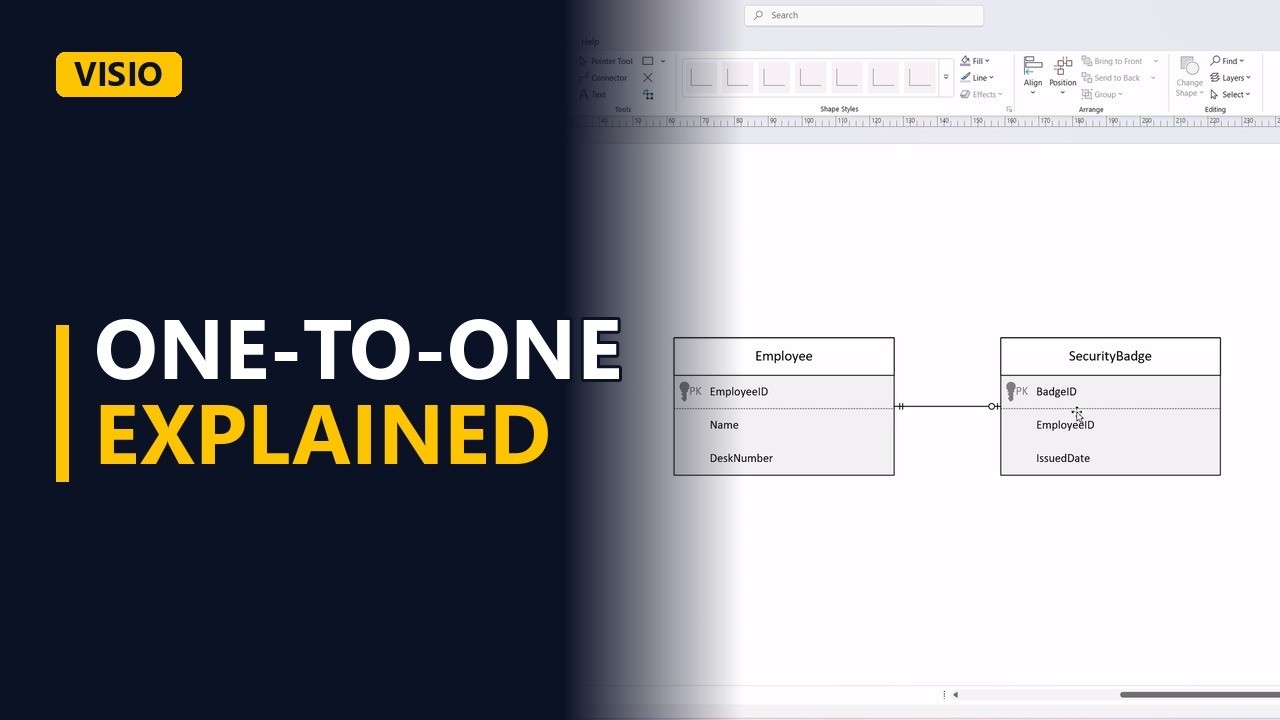
- Employee. Add an Employee entity with 3 attributes: EmployeeID, Name and DeskNumber. DeskNumber is also one-to-one, because 1 employee has 1 desk. But it is just a column, so you don't need a separate Desk entity.
- Security badge. Next, add a SecurityBadge entity with BadgeID, EmployeeID (the employee the badge belongs to) and IssuedDate.
- The ends. Connect the 2 entities with a Relationship connector. Set the Employee end to 2 bars (one and only one) and the SecurityBadge end to a circle and a bar (zero or one). Read the line both ways. An employee has zero or one badge. A badge belongs to one and only one employee.
- Why separate?. Why not merge the badge into Employee? There are 3 reasons. The badge is optional, so merging leaves empty cells. It has its own dates. And the security team owns it, not HR.
- The foreign key. The foreign key, EmployeeID, goes on the optional side, in SecurityBadge. An Employee row never needs to know about a badge.
- Done. Click an empty part of the page to deselect the shapes and see the finished pair.
- The rule. The rule: draw a one-to-one when one side is optional, has its own life or has its own owner. If the data is always there and never changes on its own, like a desk number, make it a column.
Common mistakes
- Putting the foreign key on the wrong side. Put EmployeeID in SecurityBadge, the optional side. If you put BadgeID in Employee instead, every employee without a badge gets an empty cell.
- Splitting off an entity that should be a column. DeskNumber is one-to-one, but it doesn't need a Desk entity. Only split data out when it is optional, has its own dates or has its own owner.
- Drawing 2 bars on both ends. That says every employee must have a badge. Use a circle and a bar on the SecurityBadge end to show zero or one.
- Leaving the foreign key non-unique in the real table. If EmployeeID in SecurityBadge isn't set as unique, the database allows 2 badges for 1 employee, which makes it one-to-many. Mark it unique when you build the table.
When a business analyst uses this
In a data requirements workshop for a new HR system, someone asks whether parking permits belong in the employee record. Draw Employee and ParkingPermit as a one-to-one with zero or one on the permit end, because the permit is optional and facilities owns it. Note EmployeeID as the foreign key in ParkingPermit before sign-off.
Questions people ask
What is a one-to-one relationship in an ER diagram?
One row in an entity links to at most one row in another entity. For example, an employee has zero or one security badge, and each badge belongs to one and only one employee.
How do you show a one-to-one relationship in an ER diagram?
In crow's foot notation, draw a line between the 2 entities with no crow's foot on either end. 2 bars mean one and only one, and a circle and a bar mean zero or one.
What is the difference between one-to-one and one-to-many relationships?
In one-to-one, each row links to at most one row on the other side. In one-to-many, one row can link to many rows, and a crow's foot marks the many end.