ER Diagram for a Library Management System (Visio Example, Crow's Foot)
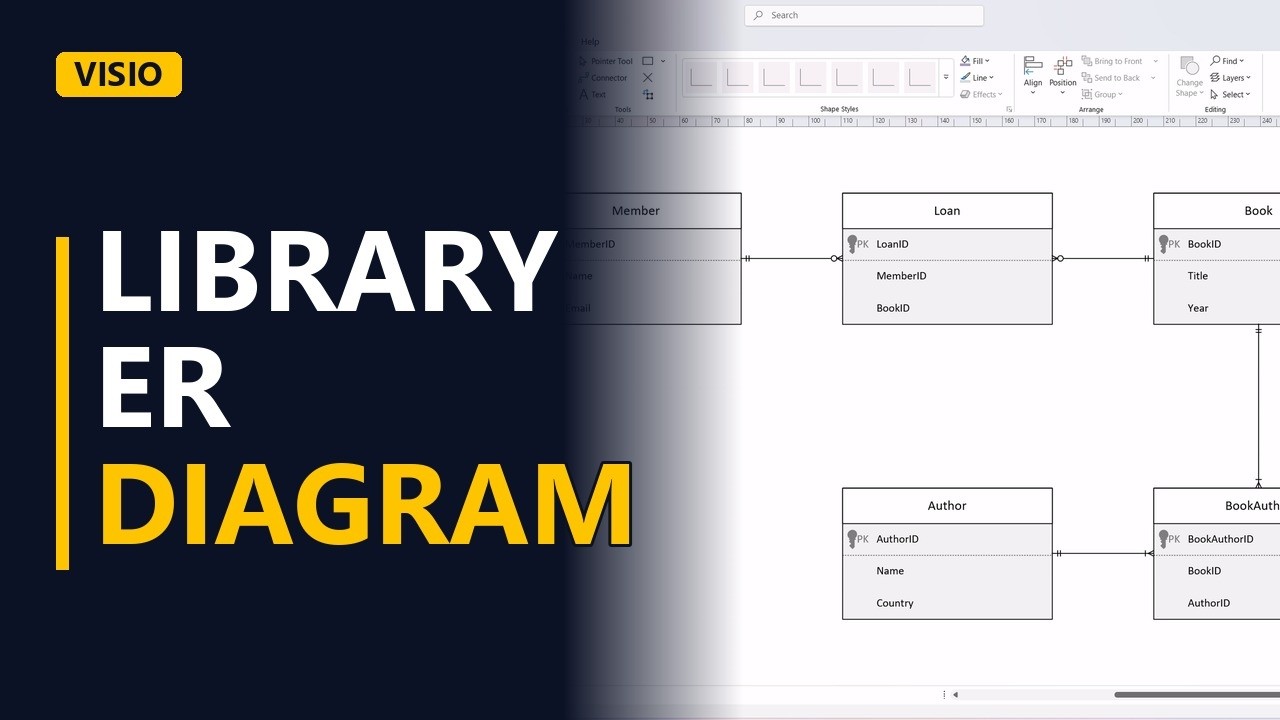
The library system is the classic ER diagram exercise. Draw Member, Book, Loan, Author and BookAuthor in Visio with crow's foot notation, and see how the two many-to-many relationships are fixed with junction entities.
Step by step
- Library ER diagram. A library system is the classic ER diagram exercise. Members borrow books, and books have authors. Here it is drawn in Visio with crow's foot notation, with one trap to watch for.
- Crow's Foot stencil. Use the Crow's Foot Database Notation stencil in the Shapes pane. It has the entity shape and the Relationship connector used below.
- Member. Add a Member entity. MemberID is the primary key, then Name and Email.
- Book. Add a Book entity on the far side of the page, with BookID as the primary key, then Title and Year.
- Loan. Here is the trap. A member borrows many books, and a book is borrowed many times, so Member and Book are many-to-many. Put a Loan entity between them with LoanID, MemberID and BookID. MemberID and BookID are the keys of the 2 entities it joins. Connect Member to Loan with a Relationship connector. One member has zero or many loans, because a new member has none yet. Then connect Book to Loan the same way. One book has zero or many loans over its life.
- Author. Add an Author entity with AuthorID as the primary key, then Name and Country.
- BookAuthor. A book can have several authors, and an author writes many books, so this is many-to-many again. Add a BookAuthor entity under Book with BookAuthorID, BookID and AuthorID. Connect Book down to BookAuthor. Every book has one or many BookAuthor rows, because every book has at least 1 author. Then connect Author across to BookAuthor. Every author has one or many BookAuthor rows.
- Done. Click away from the shapes to see the whole model: 5 entities and 4 relationships.
- The rule. The rule: when 2 entities are many-to-many (members and books, books and authors), add a junction entity between them that holds both keys. Each side then has a one-to-many line to the junction.
Common mistakes
- Drawing a many-to-many line straight from Member to Book. A database table can't store that line, and there's nowhere to keep the loan details. Put a Loan entity in the middle and give it 2 one-to-many relationships.
- Putting a single AuthorID in the Book entity. That lets each book have only 1 author. Keep author links in BookAuthor, one row per book and author pair.
- Leaving the keys out of the junction entity. Loan must hold both MemberID and BookID, and BookAuthor must hold both BookID and AuthorID. Without them the junction can't link anything.
- Using one or many where zero or many is right. A new member has no loans and a new book has never been borrowed, so the Loan side of those lines should be zero or many.
When a business analyst uses this
In a workshop for a staff training system, the business says each employee takes many courses and each course has many employees. The BA adds an Enrolment entity that holds EmployeeID and CourseID, so the data model sent to the developers for sign-off has no many-to-many lines left.
Questions people ask
What entities are in an ER diagram for a library management system?
This model has 5: Member, Book, Loan, Author and BookAuthor. Larger versions often add more, such as staff or fines, but the main idea stays the same.
What are the relationships in a library management system ER diagram?
There are 4 one-to-many lines: Member to Loan, Book to Loan, Book to BookAuthor and Author to BookAuthor. Together they handle the 2 many-to-many links: members with books, and books with authors.
Is an ER diagram the same as a data flow diagram for a library system?
No. An ER diagram shows what data is stored and how the pieces link. A data flow diagram shows how data moves between processes, such as issuing or returning a book.