BPMN Data Objects and Data Stores in Visio (Show the Paperwork)
A BPMN diagram shows the work, but where's the paperwork? Learn how to add data objects and data stores to a BPMN process in Visio, with an invoice process as the example.
Step by step
Intro
- BPMN data. A BPMN diagram shows the work, but not the paperwork. Data objects and data stores fix that. Let's add them to an invoice process in Visio.
- BPMN Shapes stencil. I'm using the BPMN Shapes stencil.
Build the process
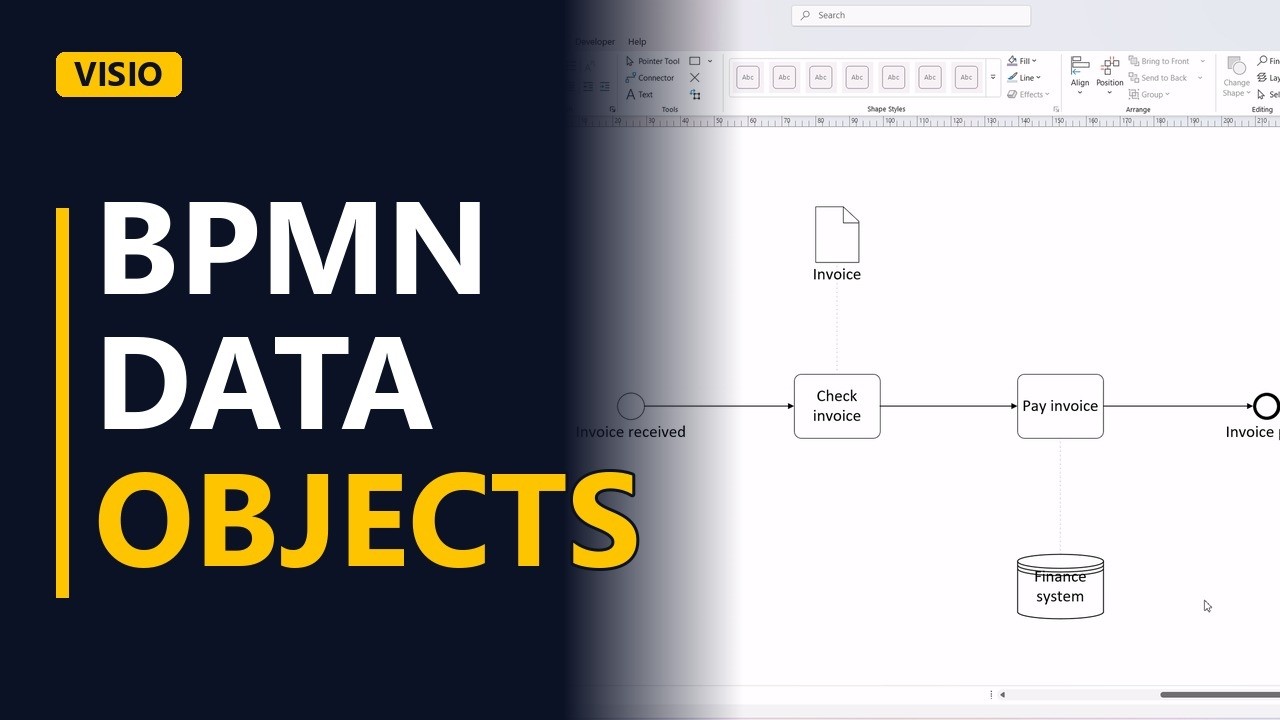
- The process. Here's a simple process. It starts when an invoice arrives. Finance checks the invoice. Connect them with a sequence flow. Then finance pays it. Connect it. And the process ends when the invoice is paid. Connect it.
Data objects
- Data object. Now the paperwork. A data object, the page with a folded corner, is information that exists only while the process runs. Here, the invoice itself. Link it to the task with an association, the dotted line. It is not a sequence flow, because data doesn't do work.
Data stores
- Data store. A data store, the cylinder, is information that lives on after the process ends. The payment is saved in the finance system. Link the pay task to it with another association.
- Done. Click away to see the result.
The difference
- The difference. So, data object for information that lives only during the process, data store for information that's kept. And always the dotted association, never a sequence flow.