Stakeholder Register in Excel (Power/Interest Grid)
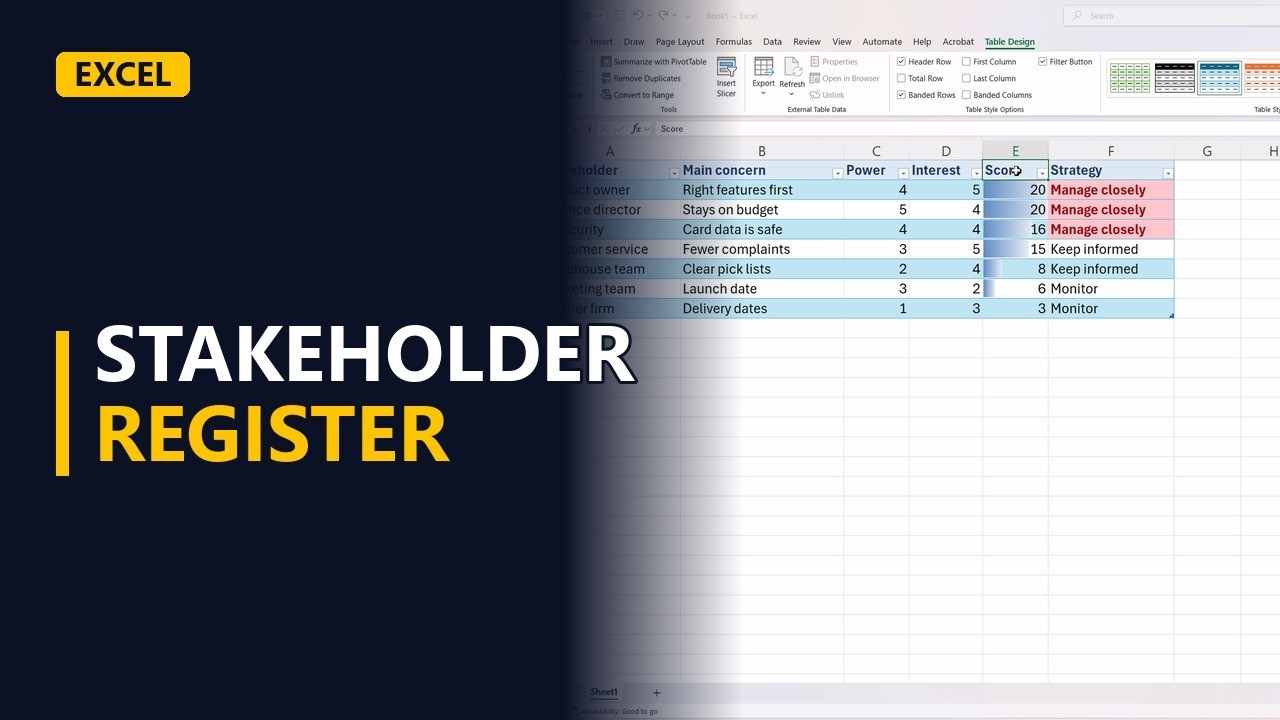
A stakeholder register lists everyone your project touches, how much power they have and how much they care. Build one in Excel for an online shop, score each stakeholder, let a formula pick the power interest grid strategy, and sort so you know who to talk to first.
Try it yourself
Copy this table into a blank sheet, then follow the steps below.
Paste at cell A1:
| Stakeholder | Main concern | Power | Interest | Score | Strategy |
|---|---|---|---|---|---|
| Finance director | Stays on budget | 5 | 2 | ||
| Product owner | Right features first | 4 | 5 | ||
| Warehouse team | Clear pick lists | 2 | 4 | ||
| Customer service | Fewer complaints | 3 | 5 | ||
| IT security | Card data is safe | 4 | 4 | ||
| Marketing team | Launch date | 3 | 2 | ||
| Courier firm | Delivery dates | 1 |
Step by step
- Stakeholder register. A stakeholder register shows who can stop your project and who just wants updates, so you spend your time on the right people. Here it is built in Excel, with a power/interest grid.
- The register. The example is an online shop project in A1:F8. Each row is a stakeholder, with the thing they care about most. The score and strategy columns, E and F, are filled with formulas.
- Power and interest. Power is how much a person can change the project. Interest is how much they care about it. Score both from 1 to 5. The finance director in row 2 has high power but low interest.
- Fill the gap. The courier firm in row 8 has no interest score yet. They care a little, about delivery dates, so type 3 in D8.
D8
3 - Header row. Select the header row, A1:F1. Make it bold and give it a light blue fill with dark blue text, so the columns stand out.
- Score them. In E2, type =C2*D2. This multiplies power by interest to give one score. The finance director gets 10. Drag the fill handle from E2 down to E8. The product owner scores 20, the highest. The courier firm scores 3.
E2
=C2*D2 - Pick a strategy. In F2, type an IF formula. If power and interest are both 4 or 5, it shows Manage closely. High power only gives Keep satisfied, high interest only gives Keep informed, and anything else gives Monitor. Fill the formula down to F8. Every stakeholder now sits in one box of the grid. Two of them are marked Manage closely.
F2
=IF(AND(C2>=4,D2>=4),"Manage closely",IF(C2>=4,"Keep satisfied",IF(D2>=4,"Keep informed","Monitor"))) - Colour the key people. Select F2:F8. Go to Home, Conditional Formatting, Highlight Cells Rules, Equal To, and type Manage closely. In the format list, choose Custom Format, then set Bold on the Font tab and a light red colour on the Fill tab. These are the people to meet most often.
- Bars for scores. Select the scores in E2:E8. Go to Conditional Formatting, Data Bars. Each score gets a bar, so the big scores stand out.
- Sort by score. Sort the register. Select A1:F8, go to Data, Sort, choose the score column, and order it largest to smallest. The people who matter most move to the top. The product owner is now first, then IT security. The courier firm is last. Start your list of meetings from the top.
- Make it a table. Format the register as a table, named Stakeholders. The header row gets filter buttons, so you can show only one strategy at a time.
- It updates itself. Say the budget gets tight and the finance director cares more. Change their interest in D5 to 4. The strategy changes to Manage closely and turns red. The row order does not update by itself.
D5
4 - Sort by score. Sort again whenever scores change. Go to Data, Sort, choose the score column, largest to smallest. The finance director moves up to second place.
- 3 register rules. Three rules: score power and interest for everyone, even the quiet people. Let a formula pick the strategy. Check the scores again every month, because people change.
Common mistakes
- Typing the strategy by hand. A typed strategy does not change when you change a score. Use the IF formula in column F so the strategy follows the power and interest scores.
- Leaving a score blank. A blank interest cell counts as 0 in the formulas, so the stakeholder gets a score of 0 and drops into a low strategy. Score both power and interest for everyone, even the quiet ones.
- Sorting only the score column. Each score formula recalculates from its own row, so sorting only column E leaves the list looking unsorted, and typed columns could end up next to the wrong people. Sort the whole register, A1:F8, so each row stays together.
- Expecting the order to update itself. The scores and strategies recalculate when you change a number, but the rows do not re-sort. Run Data, Sort again after any score change.
When a business analyst uses this
At the start of a project, a BA lists every person or group affected by it and scores them. The strategy column shows who to meet weekly and who only needs a short update. Review the scores before each phase, because a stakeholder's power or interest can change.
Questions people ask
What is a stakeholder register?
It is a list of everyone who is affected by a project or can affect it. For each person it records things like what they care about, their power, their interest and how you plan to engage them.
Is a stakeholder register the same as a shareholder register?
No. A shareholder register records who owns shares in a company. A stakeholder register lists the people and groups connected to a project, and this guide builds that second kind.
How can I make a stakeholder register in Excel without a template?
Make one row per stakeholder, with columns for power, interest, a score (=C2*D2) and a strategy picked by an IF formula. Then sort by score so the most important people are at the top.