VLOOKUP vs XLOOKUP in Excel (Which One Should You Use?)
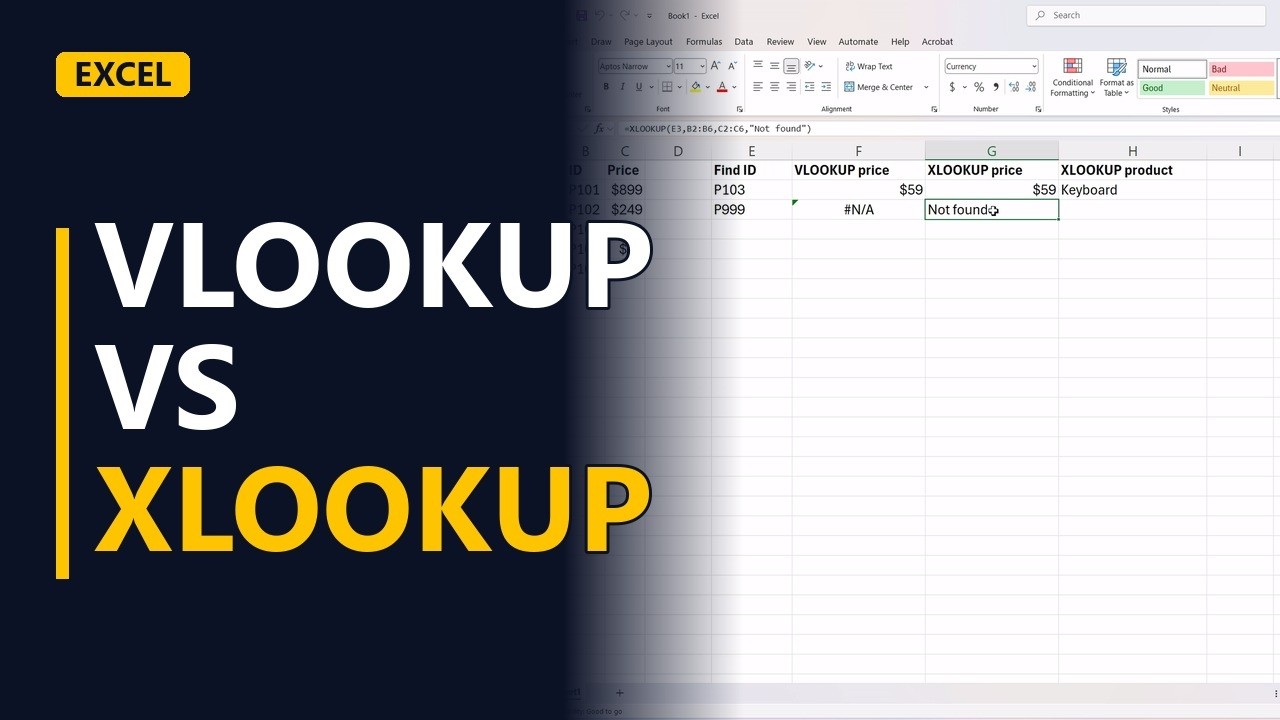
VLOOKUP and XLOOKUP both find a value in a list, but XLOOKUP is simpler and safer. See both on the same price list, why VLOOKUP cannot look to the left, and how XLOOKUP handles a missing ID without an error.
Try it yourself
Copy these tables into a blank sheet, then follow the steps below.
Paste at cell A1:
| Product | ID | Price |
|---|---|---|
| Laptop | P101 | $899 |
| Monitor | P102 | $249 |
| Keyboard | P103 | $59 |
| Mouse | P104 | $29 |
| Headset | P105 | $89 |
Paste at cell E1:
| Find ID | VLOOKUP price | XLOOKUP price | XLOOKUP product |
|---|---|---|---|
| P103 |
Step by step
- VLOOKUP vs XLOOKUP. VLOOKUP and XLOOKUP both find a value in a list and return something from the same row. Here they are side by side on one small table.
- The price list. The table has a product name (column A), an ID (column B) and a price (column C), in A1:C6.
- What we look up. We want the price of product P103, which is typed in E2.
- VLOOKUP. In F2, VLOOKUP looks for E2 in the first column of B2:C6 and returns column 2 of that range. FALSE means exact match. It returns $59. The weak spot: the 2 is a fixed count, so if someone inserts a column inside the table, VLOOKUP returns the wrong column.
F2
=VLOOKUP(E2,B2:C6,2,FALSE) - XLOOKUP. In G2, XLOOKUP takes three parts: what to find (E2), where to find it (B2:B6) and what to give back (C2:C6). Same answer, $59, with no column number to count. Exact match is the default, so there is nothing to forget.
G2
=XLOOKUP(E2,B2:B6,C2:C6) - Look to the left. The product name in column A sits to the left of the ID. VLOOKUP can only return columns to the right of where it searches. XLOOKUP can return any column, so H2 shows Keyboard.
H2
=XLOOKUP(E2,B2:B6,A2:A6) - A missing ID. Now type an ID that isn't in the list, P999, in E3.
E3
P999 - VLOOKUP. VLOOKUP returns the #N/A error.
F3
=VLOOKUP(E3,B2:C6,2,FALSE) - XLOOKUP. XLOOKUP has an optional fourth part: what to show when nothing is found. Here it shows Not found instead of an error.
G3
=XLOOKUP(E3,B2:B6,C2:C6,"Not found") - Use XLOOKUP. Use XLOOKUP: it's simpler, it looks left or right, and it handles missing values. Keep VLOOKUP only for files that must open in Excel 2019 or older.
Common mistakes
- Leaving out FALSE in VLOOKUP. Without it, VLOOKUP does an approximate match and can quietly return the wrong price from an unsorted list. Always end it with FALSE, or use XLOOKUP, which is exact by default.
- A fixed column number. Insert a column inside the table and VLOOKUP's 2 now points at the wrong column. XLOOKUP points at the return column itself, so it moves with the data.
- Ranges of different sizes in XLOOKUP. The search range and the return range must have the same number of rows, like B2:B6 and C2:C6. If they don't, XLOOKUP returns #VALUE!.
- An ID that looks right but doesn't match. Extra spaces, or an ID stored as a number in one place and as text in the other, give #N/A. Clean the ID with TRIM, or make both the same type.
When a business analyst uses this
In a requirements traceability sheet, each row has a requirement ID and the owners sit on another sheet. =XLOOKUP(A2,Owners!A:A,Owners!B:B,"No owner") pulls in each owner, and "No owner" shows the gaps to chase before sign-off, instead of a column of #N/A errors.
Questions people ask
Is XLOOKUP available in Excel 2016 or 2019?
No. XLOOKUP needs Microsoft 365, Excel 2021 or later, or Excel for the web. It won't work in Excel 2019 or older, so use VLOOKUP when a file must open there.
Does XLOOKUP work in Google Sheets?
Yes. Google Sheets has XLOOKUP with the same parts, so =XLOOKUP(E3,B2:B6,C2:C6,"Not found") works there too.
Can XLOOKUP replace INDEX and MATCH?
In most cases, yes. Like INDEX and MATCH, it can look left or right, but it's one function instead of two. INDEX and MATCH still help in older Excel versions.