How to Build a Requirements Traceability Matrix in Excel
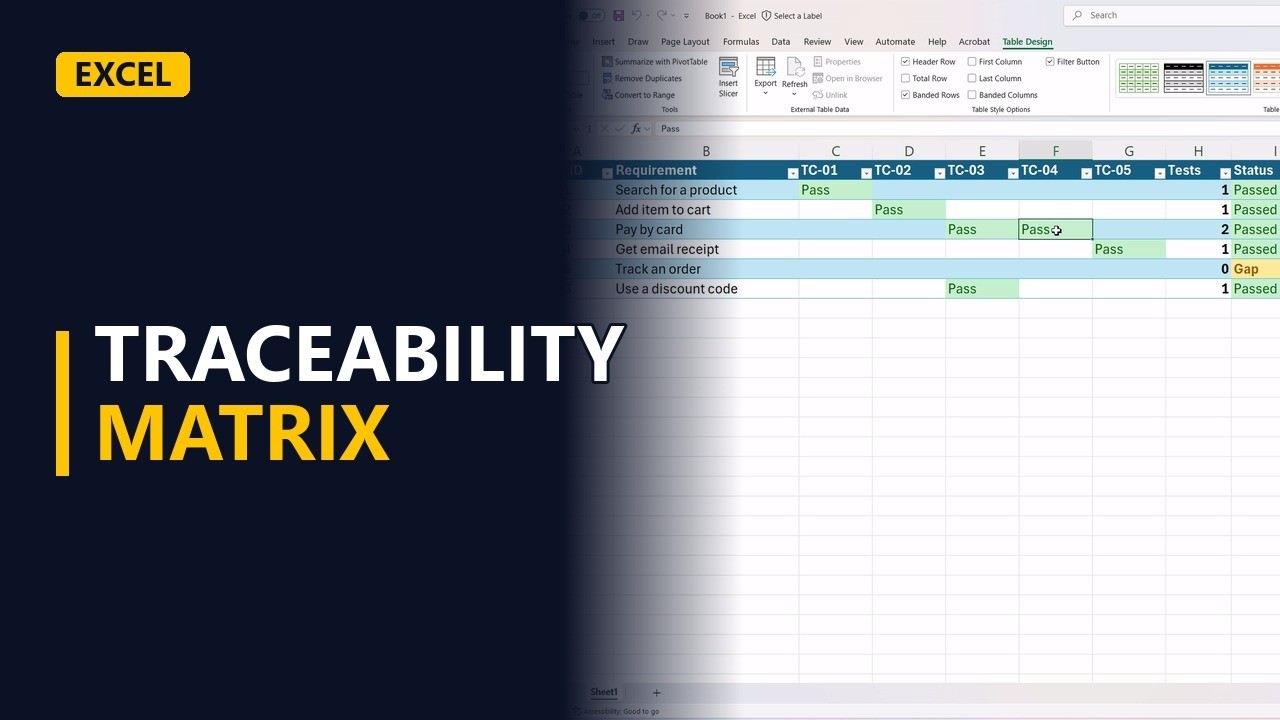
A requirements traceability matrix shows which test cases cover which requirements, and whether they passed. Build one in Excel for an online shop: count the tests per requirement, set a status with a formula, and colour the gaps and failures.
Try it yourself
Copy this table into a blank sheet, then follow the steps below.
Paste at cell A1:
| Req ID | Requirement | TC-01 | TC-02 | TC-03 | TC-04 | TC-05 | Tests | Status |
|---|---|---|---|---|---|---|---|---|
| R-01 | Search for a product | Pass | ||||||
| R-02 | Add item to cart | Pass | ||||||
| R-03 | Pay by card | Pass | Fail | |||||
| R-04 | Get email receipt | |||||||
| R-05 | Track an order | |||||||
| R-06 | Use a discount code | Pass |
Step by step
- Traceability matrix. Every requirement needs a test, and every test needs a result. A traceability matrix shows both on one page, so nothing slips through. Let's build one in Excel.
- The matrix. Here's an online shop. Each row is a requirement. Each column is a test case. The last two columns, tests and status, we'll fill with formulas.
- Where they meet. Each cell is where a requirement meets a test. Test case four checks card payments, and it failed. So this cell says fail.
- Link a test. Test case five checks the receipt email, so it covers requirement four. Type pass where they meet.
G5
Pass - Count the tests. Now count the tests for each requirement. Equals count A, C two to G two. It counts the cells that are not empty. Requirement one has one test. Drag the fill handle down to the last requirement. Requirement three has two tests.
H2
=COUNTA(C2:G2) - Find the gap. And requirement five, track an order, has zero. No test covers it. That's a gap, and it's the most important thing this matrix finds.
- Set the status. Now the status. If the count is zero, show gap. If any cell says fail, show failing. Otherwise, show passed. Fill it down. Requirement three is failing, requirement five is a gap, and the rest passed.
I2
=IF(H2=0,"Gap",IF(COUNTIF(C2:G2,"Fail")>0,"Failing","Passed")) - Colour the results. Now make it easy to read. Select the results and the status. Conditional Formatting, Text That Contains, pass, in green. Do it again for fail, in light red. That catches failing in the status column too.
- Colour the gaps. And one more for the status column. Equal To, gap, in bold yellow. Now the gap jumps out.
- Bold the count. Make the count column bold, so the number of tests stands out next to each requirement.
- Make it a table. Last, select the matrix and format it as a table. You get filter buttons, so you can show only the gaps, or only the failing requirements.
- It updates itself. And it stays live. The card payment bug gets fixed. Test it again, type pass, and requirement three turns to passed by itself.
F4
Pass - 3 matrix rules. So, three rules. Every requirement needs at least one test. Let formulas set the status, never type it by hand. And chase the gaps first.