Mermaid User Journey Map for Customer Onboarding
Type a user journey map in Mermaid: sections, steps, actors and a satisfaction score for every step. An online shop's customer onboarding, made in the free Mermaid live editor, with the pain points easy to spot.
Step by step
Journeys as text
- User journey map. A user journey map shows each step a customer takes and how they feel at each one. Here we build an online shop's customer onboarding in the free Mermaid live editor, with a score for every step.
Set up
- Diagram type. Clear the editor and type journey on the first line. On the next line, type title Online shop onboarding. This tells Mermaid to draw a user journey and gives the map its heading.
journey title Online shop onboarding
Steps and scores
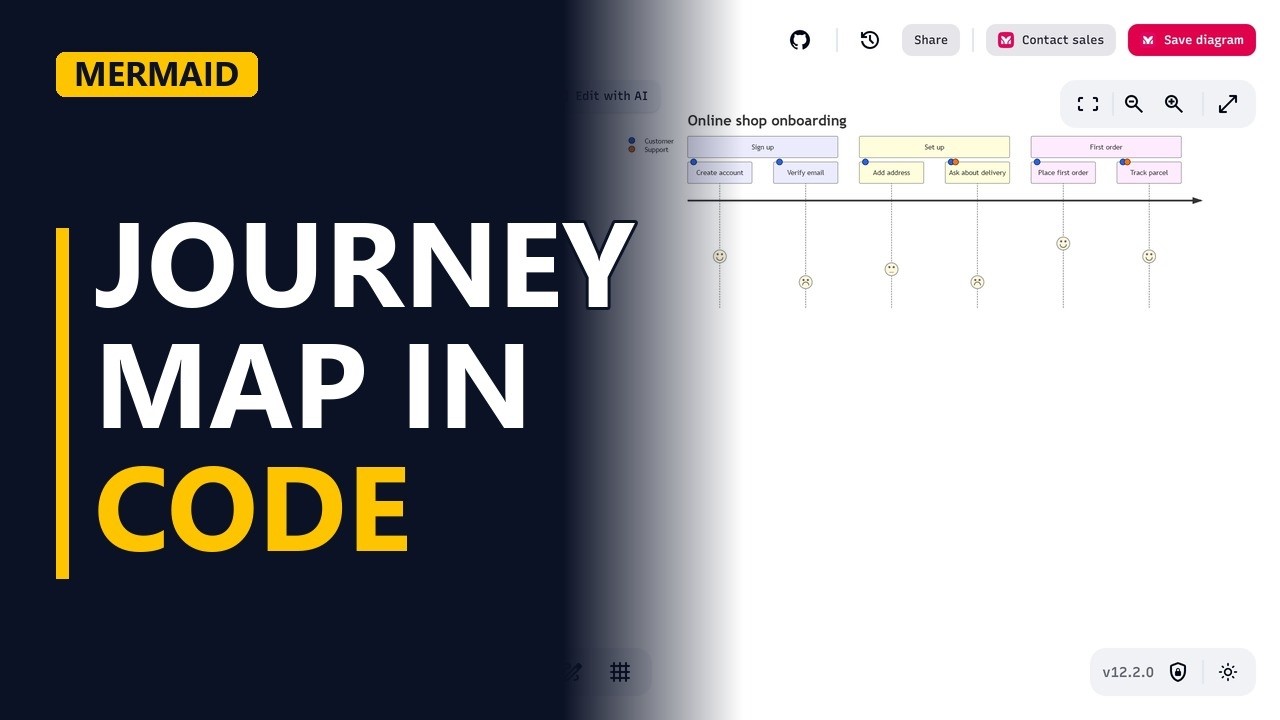
- Sections and steps. Type section Sign up to group the steps that follow. Under it, type Create account: 4: Customer. Each step is a name, a colon, a score from 1 to 5, another colon, then who does it. The first step now shows under its section. The face shows the score: 5 is a big smile and 1 is a frown.
section Sign up Create account: 4: Customer - Pain points. Add Verify email: 2: Customer. It scores 2 because customers wait for the email, and some never find it. A low score marks a pain point. The face for Verify email sits lower and looks sad, so the problem stands out at a glance.
Verify email: 2: Customer
Actors
- Actors. Type section Set up, then Add address: 3: Customer and Ask about delivery: 2: Customer, Support. When more than one actor takes part in a step, list them after the score, split by a comma. Each actor gets its own colour in the list on the left, and a dot in that colour on every step they take part in. Support's dot appears only on Ask about delivery.
    section Set up
    Add address: 3: Customer
    Ask about delivery: 2: Customer, Support
Finish the journey
- First order. Finish with section First order. Place first order: 5: Customer gets the happiest face. Track parcel: 4: Customer, Support shows support helping out. The whole journey is now drawn: 3 sections, 6 steps, 2 actors and a score for each step.
section First order Place first order: 5: Customer Track parcel: 4: Customer, Support - Pain points. Now read it like an analyst. The lowest faces are your pain points, and Verify email is the first place customers give up.
- Edit in seconds. When the problem is fixed, change the 2 in the Verify email: 2: Customer line to a higher score. The face moves up straight away, so the map stays current with no redrawing.
Recap
- The rules. To sum up: start with journey and a title, group steps in sections, and write each step as name, score and actors, split by colons. Then look for the low scores.
Common mistakes
- Putting the parts of a step in the wrong order. The order is always name, then score, then actors, as in Verify email: 2: Customer. If you put the actor before the score, the diagram won't draw properly.
- Using a colon inside the step name. Mermaid uses colons to split the name, the score and the actors, so a name like Step 1: Sign up breaks the line. Leave colons out of step names, for example Step 1 Sign up.
- Spelling an actor's name differently on different lines. If you write Customer on one step and Customers on another, Mermaid treats them as 2 actors with 2 colours. Spell each actor exactly the same way every time.
- Scoring without evidence. A score of 2 should come from something real, such as support tickets or survey results. Otherwise the pain points on the map are just guesses.
When a business analyst uses this
In a discovery workshop on customer onboarding, type the journey live while the team calls out the steps, and score each step using complaint and survey data. Low scores like Verify email become backlog items. After the fix, update the score in the text and the map stays current.
Questions people ask
What does the score mean in a Mermaid user journey?
It shows how the customer feels at that step, from 1 to 5. Mermaid draws a face for it: high scores sit higher with a smile, and low scores sit lower with a sad face.
Can one step in a Mermaid journey have more than one actor?
Yes. List the actors after the score, split by commas, as in Ask about delivery: 2: Customer, Support. Each actor gets its own colour and a dot on the steps they take part in.
How do I group steps in a Mermaid user journey?
Type section followed by a name, such as section Sign up. Every step you type below it belongs to that section until the next section line.