Mermaid Flowchart Tutorial: Your First Process Map
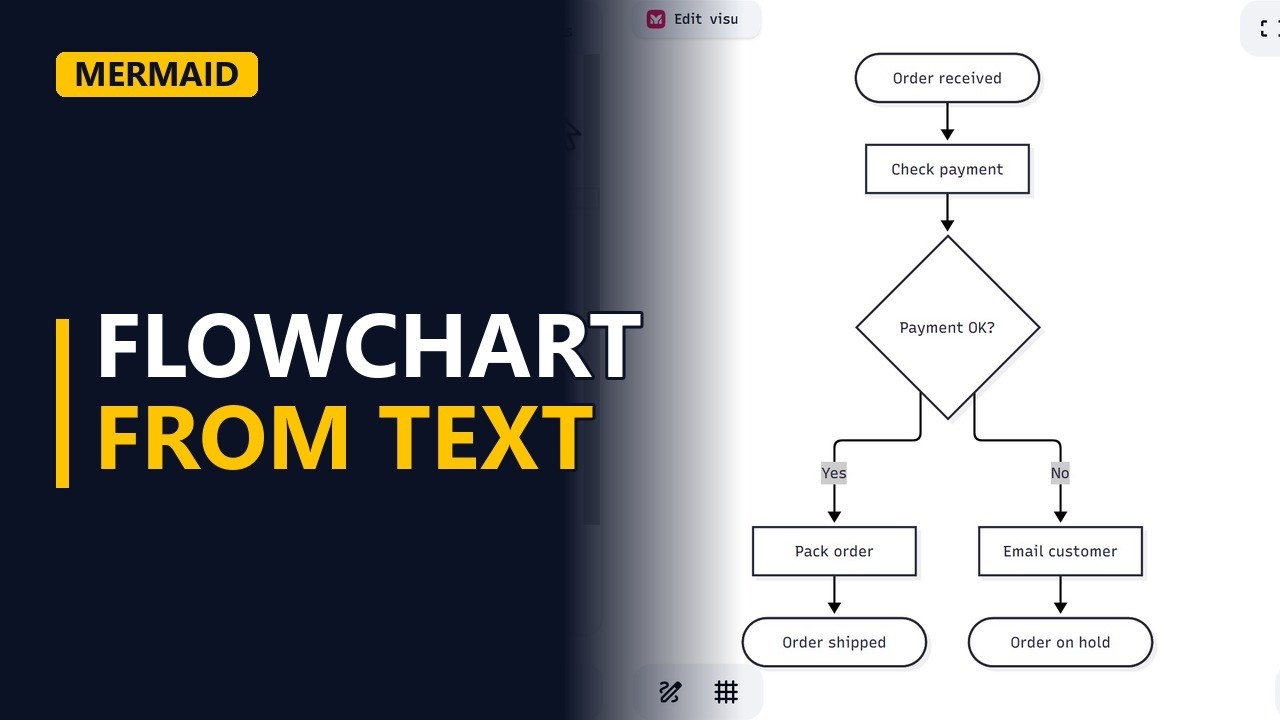
Draw a process map by typing plain text. Learn Mermaid flowchart basics in the free Mermaid live editor: nodes, arrows, a decision diamond and labelled paths, with an online shop order flow.
Step by step
Diagrams from text
- Flowchart from text. Mermaid draws a process map from plain text. Here we build the order flow for an online shop in the free Mermaid live editor.
- mermaid.live. Go to mermaid.live. You don't need to sign up. You type code in the editor on the left, and Mermaid draws the diagram on the right.
Nodes and arrows
- Diagram type. Clear the editor and type flowchart TD on the first line. The word flowchart is the diagram type, and TD means top down.
flowchart TD - Nodes and arrows. On the next line, type A([Order received]) --> B[Check payment]. A round bracket inside a square bracket gives a rounded start shape. Square brackets on their own give a box. The arrow is two dashes and a greater-than sign (-->). A and B are short IDs, and the text inside the brackets is what the reader sees.
A([Order received]) --> B[Check payment]
Decisions
- Decision. Curly brackets make a decision diamond. Type B --> C{Payment OK?} and keep the question short.
B --> C{Payment OK?} - Label the paths. Label each path out of the decision by putting the label between two pipe characters, straight after the arrow: C -->|Yes| D[Pack order] and C -->|No| E[Email customer]. Mermaid places the shapes for you, so there are no boxes to drag and no crooked lines to straighten. The Payment OK? diamond now has 2 paths out of it, labelled Yes and No.
    C -->|Yes| D[Pack order]
    C -->|No| E[Email customer]
Finish the flow
- The ends. Finish both paths with a rounded end shape: D --> F([Order shipped]) and E --> G([Order on hold]). The order flow is complete: one start, one decision, and every path finishes at an end shape.
D --> F([Order shipped]) E --> G([Order on hold]) - Edit in seconds. To change the flow, edit a line such as C{Payment OK?} and the diagram redraws itself. A change to the process map takes seconds.
Recap
- The rules. The rules: start with flowchart and a direction, write node, arrow, node, use curly brackets for decisions, and label every path out of a decision with pipes.
Common mistakes
- Leaving out the flowchart line. Mermaid needs the diagram type at the top. Without flowchart TD on the first line, the editor shows an error instead of a diagram.
- A mistyped ID. IDs are case-sensitive, so writing c --> D after defining C makes a new box called c that links to D but not to C. Copy the ID exactly each time you reuse it.
- Brackets inside a node's text. Text like B[Check payment (card)] confuses Mermaid, because round brackets are shape symbols. Wrap the text in double quotes: B["Check payment (card)"].
- Using end as a node ID. Lowercase end is a reserved word in Mermaid, so a node called end (like D --> end) breaks the flowchart. Capitalise it (End or END) or give the node a different ID, like F([End]).
When a business analyst uses this
In a process workshop, a business analyst can type the current order flow into mermaid.live while stakeholders talk. When someone mentions a check, they add a decision like Payment OK? on the spot. Saving the text with the requirements means the next change is a one-line edit, not a redraw.
Questions people ask
How do I make a flowchart in Mermaid?
Start with flowchart TD, then write one link per line as node, arrow, node, like A([Order received]) --> B[Check payment]. Use curly brackets for decisions and put path labels between pipes, like C -->|Yes| D[Pack order].
What is a simple Mermaid flowchart example?
An order flow: a rounded start shape (Order received), a box (Check payment), a decision (Payment OK?) with Yes and No paths, and 2 rounded end shapes (Order shipped and Order on hold). The full code is in the steps above.
What does TD mean in a Mermaid flowchart?
TD means top down, so the flow runs from the top of the page to the bottom. Use LR instead for a left-to-right flow.