BPMN in draw.io: Events, Tasks and Gateways
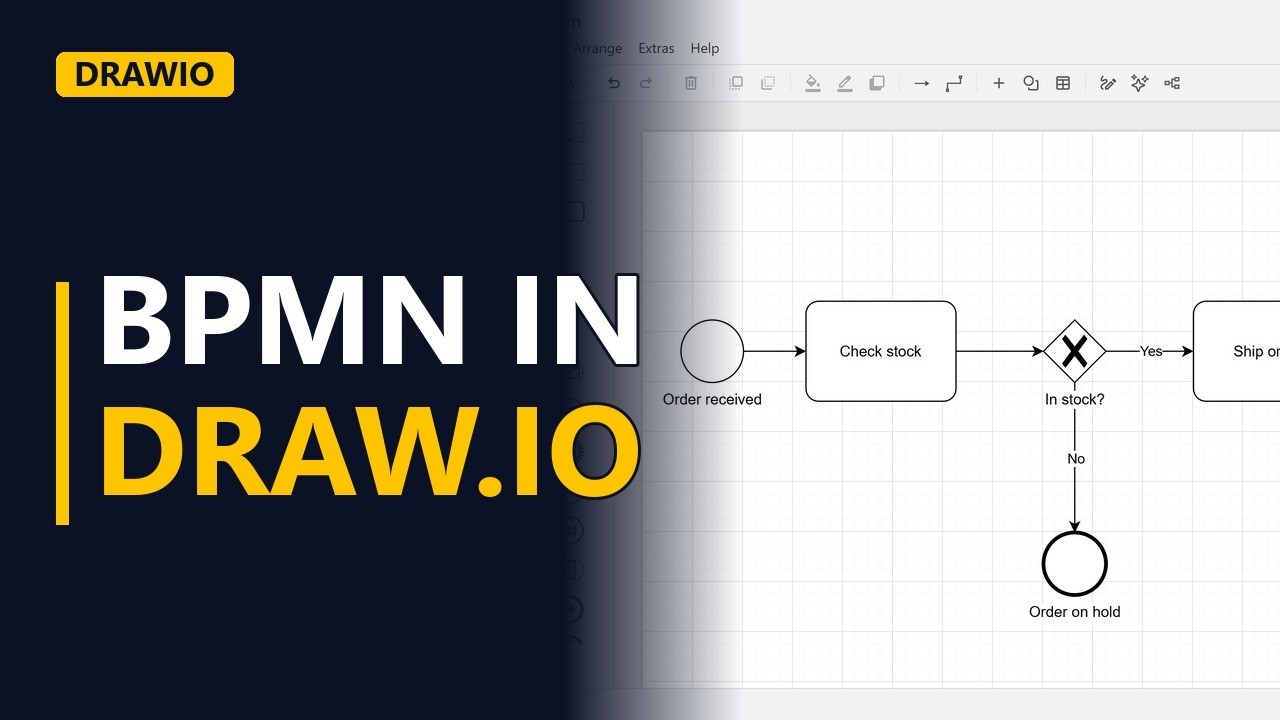
Draw a real BPMN process model for free in draw.io. Learn how to turn on the BPMN 2.0 shapes, then use a start event, tasks, an exclusive gateway with labelled flows and end events, using an online shop order process.
Step by step
BPMN for free
- BPMN in draw.io. BPMN is the standard way to model a business process, and you can draw it for free in draw.io. The example is the order process for an online shop.
- Blank diagram. Open draw.io and start with a blank diagram.
- BPMN shapes. The BPMN shapes are not on by default. Click More Shapes, tick BPMN 2.0 and click Apply. New BPMN groups appear in the shape panel on the left.
Events and tasks
- Start event. Every process begins with a start event, a circle with a thin border. From BPMN 2.0 Events, drag a None Start onto the canvas and name it Order received.
- Task. Work is shown as a task, a rounded box. From BPMN 2.0 Tasks, drag in a Generic Task and name it with a verb and a noun: Check stock.
- Sequence flow. Connect Order received to Check stock with the blue arrow. In BPMN, a solid line with an arrowhead is a sequence flow. It shows the order the work happens in.
Gateways
- Gateway. A decision is an exclusive gateway, a diamond with an X, from BPMN 2.0 Gateways. Only one path out of it is taken. Name it In stock? Then connect Check stock to the gateway.
- Label the flows. If the item is in stock, the order ships. Drag another Generic Task to the right of the gateway and name it Ship order. Connect the gateway to Ship order and label the flow Yes. Every flow out of an exclusive gateway needs a label, so readers know which condition sends work down which path.
End events
- End event. The process finishes with an end event, a circle with a thick border. From BPMN 2.0 Events, drag in an End event and name it Order shipped. Connect Ship order to Order shipped.
- Second end. If the item is not in stock, the order is put on hold. That's a different outcome, so it gets its own end event. Place a second End event under the gateway and name it Order on hold. Connect the gateway down to Order on hold and label this flow No.
- The finished model. Click an empty part of the canvas to see the finished model: 1 start event, a gateway with labelled flows, and an end event at the end of every path.
Recap
- The rules. The rules: turn on the BPMN 2.0 shapes, begin with a start event, name tasks with a verb and a noun, label every flow out of a gateway, and end every path with an end event.
Common mistakes
- Unlabelled flows out of a gateway. A diamond with two plain arrows doesn't say which path is which. Label every flow out of an exclusive gateway, like Yes and No, so the condition is clear.
- A path that just stops. Every path needs to finish at an end event. If the No path has no end, readers can't tell whether the process is finished or someone forgot a step. Give each different outcome its own end event, like Order shipped and Order on hold.
- Mixing up start and end events. Both are circles. The start event has a thin border and the end event has a thick one. Take them from BPMN 2.0 Events instead of drawing your own circles.
- Task names that are vague. A box labelled Stock or Shipping doesn't say what happens. Use a verb and a noun, like Check stock or Ship order.
When a business analyst uses this
In a process workshop with the operations team, a business analyst draws the current order process live in draw.io. Each exclusive gateway, like In stock?, makes the team say what happens on the Yes and No paths, and those answers become business rules in the requirements log.
Questions people ask
How do I turn on BPMN shapes in draw.io?
They are not on by default. Click More Shapes, tick BPMN 2.0 and click Apply, and the BPMN groups appear in the shape panel on the left.
Which BPMN symbols do I need for a basic process in draw.io?
A start event (thin circle), tasks (rounded boxes), an exclusive gateway (a diamond with an X) for decisions, and an end event (thick circle), joined by sequence flows (solid arrows).
Can I draw a BPMN diagram in draw.io for free?
Yes. draw.io is free, and the BPMN 2.0 shapes are built in. You only need to turn them on from More Shapes.