Data Flow Diagram Level 0 and 1: Draw Both, Step by Step (Full Example)
A data flow diagram shows where data comes from, what changes it, where it is kept and where it goes. In this video I draw a data flow diagram level 0 and level 1 for a made-up online shop: the 4 symbols, the 5 rules, a 5-step method, and how following one piece of data found the shop's bug. Then I build the start of it in draw.io.
Step by step
A DFD shows data, not steps
- Here's the thing. A data flow diagram is not a flowchart with funny shapes. It has no order and no decisions. It shows the data: where it comes from, which processes change it, where it's kept, and where it goes. That's all. The Bay bok Guide, the business analysis body of knowledge from the I IBA, lists data flow diagrams as one of its techniques. We'll use the online shop, the same made up company from my tool tutorials. Its website keeps selling things that are already sold out. We'll draw a level zero and a level one diagram, and use them to find out why.
Explain like I'm 5: the water pipes
- Explain it like I'm five? Think of the water pipes in a house. Water comes in from the street. The kettle heats it up. The tank keeps it for later. And pipes carry it from place to place. The plumber's drawing doesn't say who showers first. It only shows where the water goes. A data flow diagram is that drawing, for data. The street is an external entity. The kettle is a process. The tank is a data store. And the pipes are the data flows. So when water goes missing, the drawing tells you which pipe to check.
Four elements and the levels (BABOK)
- The Bay bok Guide describes four elements. External entities: people, groups or other systems outside, that send data in or get data out. Processes: the work that turns data coming in into data going out. Data stores: places where data is kept, to be used again later. And data flows: the data moving between them. It also describes levels. The context diagram, also called level zero, shows the whole system as one process. Some books keep those two apart, so check which one they mean. Level one opens that process up into its main processes. Level two opens up one of those, and so on. My tip: to talk with the business, level one is usually enough.
Before you draw: three lists
- So what do you need before you draw? Three short lists. One: the outsiders. Who sends us data, and who gets data from us? For our shop, the customer, the payment provider, the supplier and the courier. Two: the data that crosses the border. Look at real things: the order screen, the payment result, the shipping label, the supplier's delivery note. Three: what the system does with that data, as a verb and a noun. Take order, take payment, pack and ship, update stock. Then walk those lists past the people who do the work. Half an hour, and the drawing almost draws itself.
The vague problem
- So here's our situation. The sales manager of the online shop walks up and says: the website sells stuff we don't have. Fix the system. Is that a requirement? No. Which stuff? Since when? Fix what, exactly? Nobody can say, because nobody knows where the stock number on the website comes from. And that's exactly the question a data flow diagram answers. So here's the plan. First, the four symbols. Then the rules that keep a diagram honest. Then we draw both levels.
Symbols 1-2: entity and process
- Symbol one: the external entity. A plain box. It's someone, or something, outside the system that sends data in or gets data out. Our customer is one. So are the payment provider, the supplier and the courier. We never draw what happens inside their world. Symbol two: the process. In the style we use, it's a circle, often called a bubble. It takes data in, does something with it, and sends data out. Name it with a verb and a noun, like take order. At level one it gets a number too, so a level two diagram can point back to it. Ours has four: take order, take payment, pack and ship, and update stock.
Symbols 3-4: store and flow
- Symbol three: the data store. A box with one open side, and a name like D one, orders. It's where data waits until a process needs it again. A store never does anything by itself. Ours has two: orders and stock. Symbol four: the data flow. An arrow, and every arrow gets a label. The label is the data it carries, a noun, never an action. So not, send order. Just, order. Look at the customer's arrow into take order. It carries the order. And this arrow, from the stock store into take order, carries the stock level. That's the number the website shows. Remember it.
Five rules that keep it honest
- Now the rules. They keep a diagram honest, and they catch real problems. Rule one: every flow touches a process. Data never jumps from a customer straight into a store, or from one store to another. Something has to do the work. Rule two: no flows between two outsiders. What they say to each other is outside our system. Rule three: every process has data in and data out. A process with no output is a black hole. One with no input is a miracle. Rule four: every flow has a noun label. And rule five: level one must match level zero. The same flows in and out, nothing new, nothing missing.
Step 1: draw level 0 first
- Step one: draw level zero first. One bubble in the middle, the whole online shop system. Around it, the four outsiders. Then the flows that cross the border. The customer sends an order and gets an order confirmation back. The shop sends a payment request to the payment provider and gets a payment result back. It sends a shipping label to the courier. And the supplier sends a delivery note. Six flows. That's the context diagram, and it's your contract for level one. My step by step context diagram tutorial covers it in detail.
Step 2: processes and border flows
- Step two: open up the bubble. The four outsiders stay on the edges, just like level zero. Now place the processes, and bring each border flow down to the process that handles it. Take order gets the customer's order. Take payment sends the payment request, gets the result, and sends the confirmation. Pack and ship sends the shipping label to the courier. And update stock gets the supplier's delivery note. Count them: six border flows, the same six as level zero. That's called balancing. What's left now is the data inside the shop.
Step 3: stores and inside flows
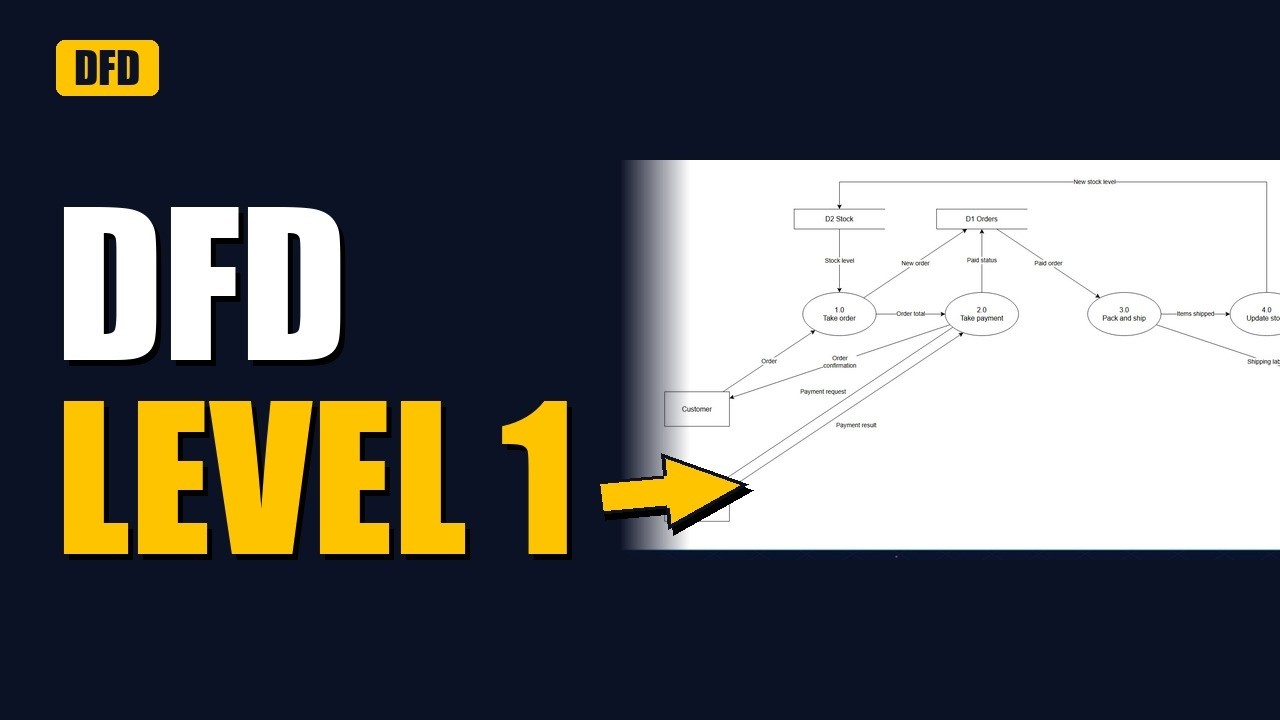
- Step three: add the stores and the flows inside. Ask: what data has to wait for later? Orders wait between taking them and packing them. So take order writes a new order into D one, orders. It also passes the order total to take payment. Take payment writes the paid status back to orders. And pack and ship reads the paid order from the store. The second store is D two, stock. Take order reads the stock level, to check there's enough to sell. And update stock writes the new stock level. Now every process has data in and data out.
Step 4: check the rules, follow the data
- Step four: check the rules, then follow the data. Every flow touches a process? Yes. No flows between outsiders? Yes. Now pick one piece of data and follow it all the way: the stock level. Update stock writes it. Take order reads it. But what makes it go down? Look at update stock. The only data coming in is the supplier's delivery note. So stock goes up when boxes arrive, and nothing in the system brings it down when parcels leave. That's our leak.
Step 5: ask why, then fix the flow
- Step five: take the gap to the people who do the work. We ask the warehouse team: when a parcel leaves, how does the stock go down? The answer: Sam types the shipped items into the stock system by hand, every Friday. So for up to a week, the website sells stock that's already gone. Nobody mentioned it until the diagram asked. The fix is one new flow: pack and ship sends the items shipped to update stock, every time a parcel leaves. Now update stock gets data from both sides, and the number on the website is right.
Worked example: the finished level 1
- Now let's put it all together. Here's the finished level one diagram. The customer sends an order into take order, process one. Take order checks the stock level, writes the new order into orders, and passes the total on. Take payment, process two, talks to the payment provider, marks the order as paid, and confirms it to the customer. Pack and ship, process three, reads the paid order, sends the label to the courier, and now tells update stock what left. Update stock, process four, adds what the supplier delivers and takes away what was shipped. Four processes, two stores, four outsiders, thirteen flows, one page.
Build it in draw.io
- Watch me build the start of it in draw.io. It's free, and anyone on your team can open it. Click more shapes, tick data flow diagram, and click apply. The shapes sit at the bottom of the panel: a bubble for a process, a plain box for an outsider, an open box for a store. First the customer. It sits outside our system, so it's an external entity, a plain box. I drag it to the left and name it customer, a role, not a person. Next, the bubble for process one. I type one point oh, then take order, a verb and a noun, so a level two diagram can point back to it. Now hover over the customer and drag the blue arrow onto the bubble. Then label it with the data it carries, a noun: order, not send order. Last for now, the data store. I drag the open box under take order and name it D one, orders. The rest of the diagram goes on the same way.
Confirm it and write the fix
- And don't stop at the drawing. Play it back. Walk the warehouse team, finance and the sales manager through both levels, and ask: is anything missing? Then turn the fix into requirements. Requirement one: when a parcel ships, the stock level drops for every item in it, straight away. Requirement two: the website never offers more than the stock level. And write down what's out of scope: supplier returns, for a later release. Where does it all go? Put the diagram on the Confluence page with the requirements, and link it from the Jira story.
5 common mistakes
- Now, five common mistakes. One: drawing steps and decisions. If your arrows say yes and no, you've drawn a flowchart. Two: verbs on the arrows. Send order is an action. Order is data. Three: a customer writing straight into a store. Put a process in between. Four: a black hole, a process with data going in and nothing coming out. Or a miracle, with data coming out of nowhere. And five: a level one that doesn't match level zero. If a new outsider shows up, go back and fix level zero first.
Recap
- Quick recap. A data flow diagram shows data, not steps. Four symbols: the external entity, the process, the data store and the data flow. Level zero shows the whole system as one bubble. Level one opens it up into numbered processes, with the same border flows. Then add the stores, check the rules, and follow one piece of data all the way through. That's how we found the shop's leak. Want to build both levels yourself? My step by step draw.io tutorials for the context diagram and the level one data flow diagram are in the playlists on the channel.