BPMN Explained: The 5 Building Blocks Every Business Analyst Should Know
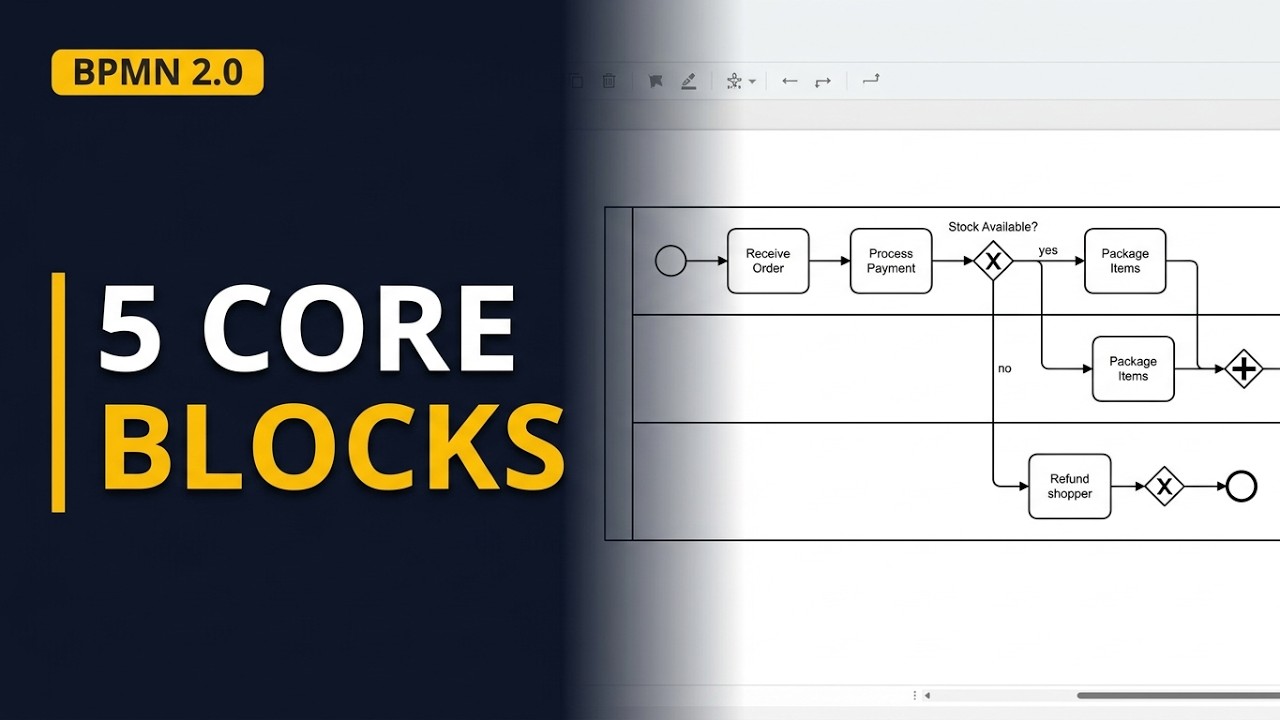
Circles, diamonds, dashed arrows: what does a BPMN diagram actually mean? In this video I explain BPMN on one complete diagram: the 5 building blocks (events, activities, gateways, flows, pools and lanes), how to read any BPMN diagram in 6 steps, and one full order process from a made-up online shop, start to finish, including the gap we find and then fix live in bpmn.io. Plus the 5 BPMN mistakes to avoid.
Step by step
BPMN is a language, not a tool
- BPMN stands for Business Process Model and Notation. It's a language for drawing processes, not a tool. It's an open standard from the OMG (Object Management Group), and the current version is 2.0.2. Unlike a loose flowchart, it means the same to everyone who knows the rules.
Explain like I'm 5: road signs
- Think of road signs: a red octagon means stop in any town. BPMN shapes work the same way. A circle is an event, a box with round corners is work, and a diamond splits or joins the path. Learn the shapes once and you can read a diagram without its author.
What's in the BPMN spec
- The spec sorts its elements into 5 groups: flow objects (events, activities, gateways), data (objects and stores), connecting objects (lines), swimlanes (pools, lanes) and artifacts (notes, groups). Most diagrams need just 5 blocks: events, activities, gateways, flows, and pools with lanes.
Before you read: three questions
- Answer 3 questions first. What starts it? A shopper places an order. What ends it? The parcel leaves, or the order is cancelled. Who's involved? The website, customer service and warehouse, plus the shopper and payment provider. Name each step verb + noun, like Check stock.
Block 1: events (circles)
- An event is something that happens, drawn as a circle. A thin border is a start event, a double border an intermediate event, and a thick border an end event. The icon inside says what kind: an envelope is a message, a clock a timer. Order received and Payment confirmed are message events.
Block 2: activities (round boxes)
- An activity is work, drawn as a box with round corners. A task is one piece of work, like Check stock; the order process has 6. A small plus sign at the bottom marks a sub-process, with a whole process folded inside. One box, one job: if the name has "and", split it.
Block 3: gateways (diamonds)
- A gateway is a diamond that splits or joins the path; it does no work. An X (or empty diamond) is exclusive: exactly 1 path. A plus is parallel: every path runs, and the join waits for all. A circle is inclusive: 1 or more paths. Write exclusive gateways as questions, like In stock?
Block 4: flows (the lines)
- A solid line with a filled arrow is a sequence flow: the order of work inside one pool. A dashed line with a small circle at the start and an open arrow is a message flow between pools. A dotted line is an association, linking a note to what it explains.
Block 5: pools and lanes
- A pool is one participant, like a company or outside system. A lane is a strip inside it, usually a role or department. The online shop pool has 3 lanes: website, warehouse and customer service. Sequence flows stay inside one pool; between pools, only messages.
Read it in 6 steps: the cast and the start
- Step 1: find the pools and lanes, the cast. Here it's one pool, the online shop, with 3 lanes; the shopper and payment provider only send messages in. Step 2: find the start event. It's the envelope in the website lane, Order received, so a message starts the process.
Step 3: follow the token
- Step 3: follow the flow with a token, an idea from the BPMN spec. Push it like a coin along the arrows: Order received, then Request payment, which sends a message to the payment provider. The token waits at Payment confirmed until the reply arrives, then moves to Check stock.
Step 4: stop at every gateway
- Step 4: at each gateway, ask what kind it is and what each path means. After Check stock comes In stock? On yes, a parallel gateway splits the token: Send confirmation email and Pack parcel. A second parallel gateway waits for both, then Ship parcel and Order shipped.
Step 5: check every message
- Step 5: check every message between pools and ask what happens if it never comes. Here Payment confirmed waits forever, so the order gets stuck and nobody knows. A fix is a timer: if no payment arrives within 30 minutes, the order is cancelled.
Step 6: find every end
- Step 6: find and count the end events. This diagram has 2: Order shipped, and Order cancelled on the no path after customer service refunds the shopper. Check that every path reaches an end; a path that stops mid-way usually hides a gap in the real process.
Worked example: the whole order process
- The full story: the website receives the order and requests payment. Once confirmed, it checks stock. If in stock, the website sends the email while the warehouse packs; then the warehouse ships it and the order ends as shipped. If not, customer service refunds and the order is cancelled.
Fix the gap: build it in bpmn.io
- In bpmn.io, name the start event Order received and add the task Request payment. Add a gateway, then 2 intermediate events from it: Payment confirmed (wrench: message catch event) and 30 minutes (wrench: timer catch event). Finally change the gateway to event-based: the first event wins.
Walk it through, then the tools
- The payment path goes on to Check stock; the timer path goes to customer service, who cancel the order. Then walk the diagram with the people in it and ask: is this what really happens? Draw it in bpmn.io, Camunda Modeler, draw.io or Visio; the notation is the same in each.
5 common mistakes
- 5 mistakes: work inside a gateway (put a Check stock task before it), sequence flows between pools (use messages), paths that go nowhere (add an end event), mixed levels (use a sub-process) and missing labels (label every gateway and task).
Recap
- Recap: events are circles (thin start, double intermediate, thick end), activities are round-cornered boxes, and gateways are diamonds (exclusive, parallel, inclusive). Solid lines are sequence, dashed are messages. Read in 6 steps: cast, start, token, gateways, messages, ends.
Common mistakes
- Putting the work inside a gateway. A diamond only routes the path; it can't check stock. Add a Check stock task before it and put the question, In stock?, on the gateway.
- Sequence flows between pools. Solid sequence flows stay inside one pool. Between participants, such as the shop and the payment provider, use dashed message flows.
- Waiting for a message with no way out. An intermediate event like Payment confirmed can wait forever. Use an event-based gateway with a timer event, such as 30 minutes, so the order is cancelled instead of stuck.
- Unlabelled gateways and vague task names. Write each exclusive gateway as a question and label every path with its answer. Name tasks verb + noun, like Pack parcel, not Process data.
When a business analyst uses this
In a process workshop, a business analyst draws the current order process in BPMN and walks the token through it with customer service and the warehouse lead. Gaps like a payment that never arrives, or a missed path for gift orders, show up before requirements are signed off.
Questions people ask
What does BPMN stand for?
BPMN stands for Business Process Model and Notation. It's an open standard from the Object Management Group (OMG), and the current version is 2.0.2.
What are the main types of BPMN gateways?
Exclusive gateways (an X or empty diamond) take exactly 1 path, parallel gateways (a plus) run every path, and inclusive gateways (a circle) take 1 or more. An event-based gateway waits and follows whichever event happens first.
What is BPMN used for?
It's used to draw business processes so the business, analysts and developers read them the same way. Analysts use it to map how work flows, check every path has an end, and find gaps before anything is built.